
Convert an article to blank page type
Abstract
After creating an Article, you will maybe change your mind and want to have a "blank page" type instead on an "Article" type. Remove all the content is not suffisent you have to change the objects of the page
Go to the objects editor of the page
- This is my article page https://wiki.ebrains.eu/bin/view/Collabs/0-12-3-release/Article%20demo/
To access the editor objects mode I have to change the url in this way ( replace view by edit ) and add WebHome?editor=object
then you should see this
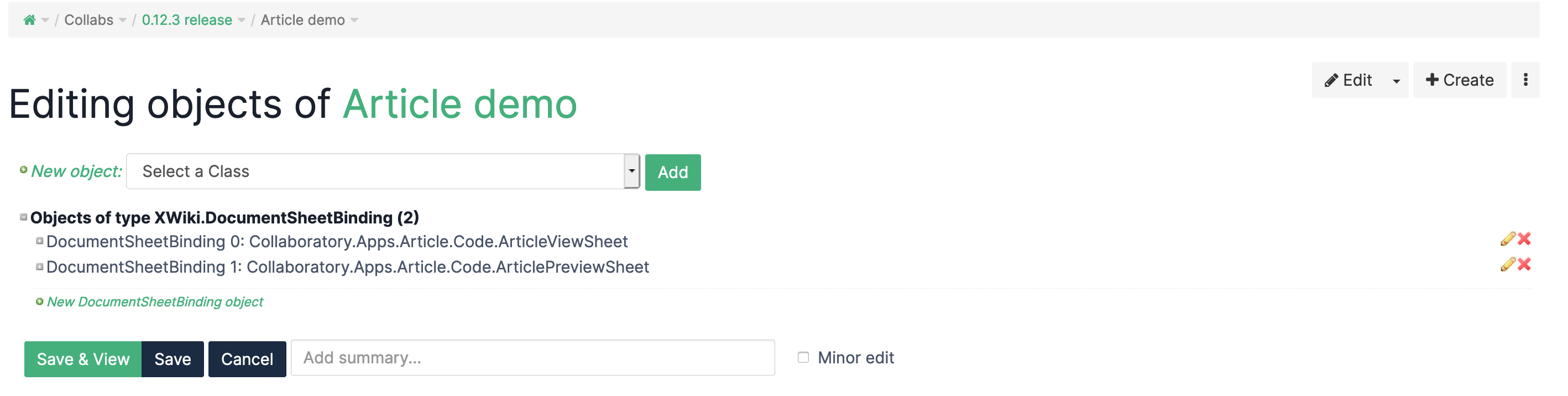
If it doesn't appear try without WebHome in the url
https://wiki.ebrains.eu/bin/edit/Collabs/0-12-3-release/Article%20demo/?editor=object
or
https://wiki.ebrains.eu/bin/edit/Collabs/0-12-3-release/Article%20demo?editor=object
Without the slash you are editing the xwiki space instead of final page, but it's probably not what you want.
Remove the objects
Then remove the 2 articles objects by clicking the red cross and save.
It's done